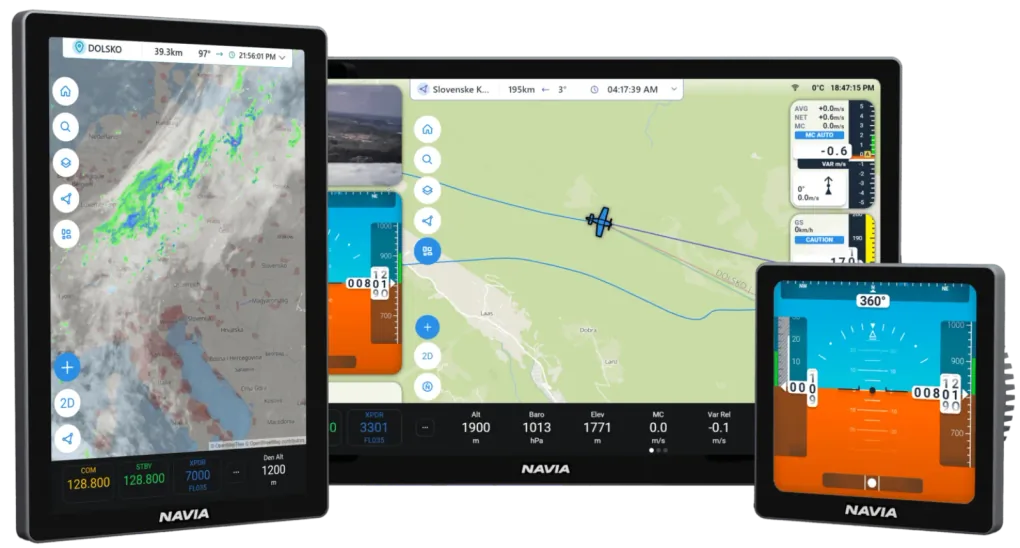
One system that knows what it is flying. Tell Navia you fly a glider and it thinks in final glide and MacCready; tell it an airplane and it thinks in flight plans, engines and radios.
Final glide, MacCready and the task. Navia thinks like a soaring pilot.
LJCE39.3 km97°
MC
1.5m/s
VARIO
+2.4m/s
ALT
1530m
STF
110km/h
L/D
38
ARR
+240m
VARIO
Hear the lift.
The vario loop runs a hundred times a second. Choose one of four tone waveforms, let Navia switch between climb and speed-to-fly on its own, and pair a Bluetooth headset — it hears exactly what the cockpit speaker plays.
100 Hz vario loop4 tone waveformsClimb / cruise switching
Your track is coloured by the climb you found in it, so the core sits where the colours run warmest. Every circle feeds the thermal statistics — average climb, height gained, circle radius and time.
MacCready, bugs and ballast drive the final glide, the glide-range line on the map and the colour of every airfield in reach. Nearest Landable is one tap away — airports and outlanding fields alike.
Racing, AAT and record tasks, with normal, classic, Grand Prix and pilot-event starts. Choose your competition from SoaringSpot, and the day’s task and contest airspace load themselves.
4 start proceduresSoaringSpotOLC scoring
SoaringSpot with LX Cloud Premium.
WEATHER
Fly the forecast.
SkySight thermal, convergence and cloudbase layers, TopMeteo forecasts, live rain radar and satellite — over the same map you navigate on. A published SkySight task imports with one tap.
SkySightTopMeteoLive radar
SkySight and live weather with LX Cloud Premium; TopMeteo with your own TopMeteo account.
LOGBOOK
Every flight, kept.
Each flight lands in the logbook with its track, barogram and replay. Add the IGC licence and the flight recorder signs every file.
More than a hundred spoken commands — radio, transponder, QNH, direct-to, checklists, MacCready — recognised on board, with no connection needed.
Every aircraft around you.
FLARM and ADS-B from Navia Traffic, plus OGN traffic over the internet — on the map, with warnings spoken by clock position from the direction of the threat.
Online wherever you land.
Built-in mobile data keeps Navia in sync with LX Cloud — settings, tasks and flights — and brings in weather, competition tasks and updates over the air. Any update can be rolled back.
One cable per screen.
Gigabit Ethernet and power over a single cable. Add the Hub when you run more than one display, and the panel grows by plugging in.
Navia OS updates arrive over the air. A few of the things added lately:
SoaringSpot
Competitions, built in
Pick your competition; the day’s task and contest airspace load themselves.
TASK
Four start procedures
Normal, classic, Grand Prix and pilot event — with gate time and arm / disarm.
WEATHER
SkySight & TopMeteo
Forecast layers on the map, and SkySight tasks imported in a tap.
WEATHER
Live radar and satellite
Animated rain radar and satellite imagery over your route.
EMU
Engine limits in colour
Engine data coloured by your engine’s own limits, with radial CHT and EGT gauges.
MAP
Airport diagrams and 3D
Runways, taxiways and hangars at high zoom; 3D terrain and 3D airspace.
MAP
US sectionals, automatically
The right FAA sectional chart, picked from your GPS position.
DISPLAY 4
A layout for the 4″ square
Navia OS rearranged for the smallest Navia display.
AUDIO
Bluetooth headsets
Vario, alerts and voice mirrored to the headset you fly with.
OVER THE AIR
Updates you can undo
Displays update over the air, and any update can be rolled back.
AT A GLANCE
One system, three cockpits.
Feature
Vario with speed-to-fly audio
●Standard
●Standard
—Not applicable
Thermal assistant and statistics
●Standard
●Standard
—Not applicable
Final glide and reachability
●Standard
●Standard
—Not applicable
Racing and AAT tasks, competition starts
●Standard
●Standard
—Not applicable
Flight plan with ETE and ETA
—Not applicable
—Not applicable
●Standard
Signed IGC flight recorder
○Optional
○Optional
—Not applicable
Engine noise and engine time
—Not applicable
●Standard
—Not applicable
PFD with attitude
○Optional
○Optional
●Standard
Angle of attack
—Not applicable
—Not applicable
○Optional
Engine monitoring (EMU)
—Not applicable
—Not applicable
○Optional
Radio and transponder control
●Standard
●Standard
●Standard
Voice commands
●Standard
●Standard
●Standard
FLARM, ADS-B and OGN traffic
○Optional
○Optional
○Optional
Weather layers
●Standard
●Standard
●Standard
Weight and balance
●Standard
●Standard
●Standard
VP-X electronic breakers
—Not applicable
—Not applicable
○Optional
● Standard · ○ With the matching sensor, licence or device · — Not part of that cockpit
FIVE QUESTIONS
Find the Navia that fits your cockpit.
Tell us what you fly, how you fly it and how much panel you have. We put the system together — with prices — and you can take it to the cart or to a dealer.
The glider build of Navia OS runs in your browser — on a laptop at home or on a tablet at the airfield. Plan a task, move the widgets where you want them, set up your pilot profiles. Sign in with your LX Cloud account and none of it is throwaway: Navia carries a built-in worldwide eSIM, so everything you prepared on the ground is waiting for you in the cockpit the next time the instrument connects.
Free, in any browser. Sign in with your LX Cloud account rather than continuing as a guest — that is what keeps your tasks, layouts and profiles.
Frequently asked questions
Which aircraft is Navia for?
Gliders, motorgliders, ultralights, light-sport and experimental aircraft. Navia is not TSO or ETSO approved: it is tested to DO-160 and intended for VFR flight. For a certified airplane, look at iris All-in-one Certified.
What changes when I tell Navia I fly an airplane?
The aircraft category in the setup decides how Navia thinks. A glider gets final glide, MacCready, racing and AAT tasks and the vario tools; an airplane gets flight plans with ETE and ETA, the cockpit map style and terrain awareness. The hardware is the same family.
Do I need LX Cloud Premium?
No — Navia flies without it. Premium adds the online services, SoaringSpot, SkySight and live weather among them. TopMeteo works with your own TopMeteo account.
Which languages does Navia speak?
Navia OS is available in eleven languages, among them English, German, Spanish, French, Italian and Portuguese. Voice commands are spoken in English.
NOT SURE YET?
Talk it through before you decide.
A free online video call with LX navigation or one of our dealers — in your language, about your panel, your aircraft, your questions.