IRIS SERIESGEN 2 · NEW

iris Gen 2.
Full circle.

A fully round LCD with no covered area, WiFi built into every device — and a lineup cut down to two instruments. Configure either one straight from your phone, no CAN2WiFi box needed.

57 mm cutout · WiFi inside · two models: iris AiO and iris Display
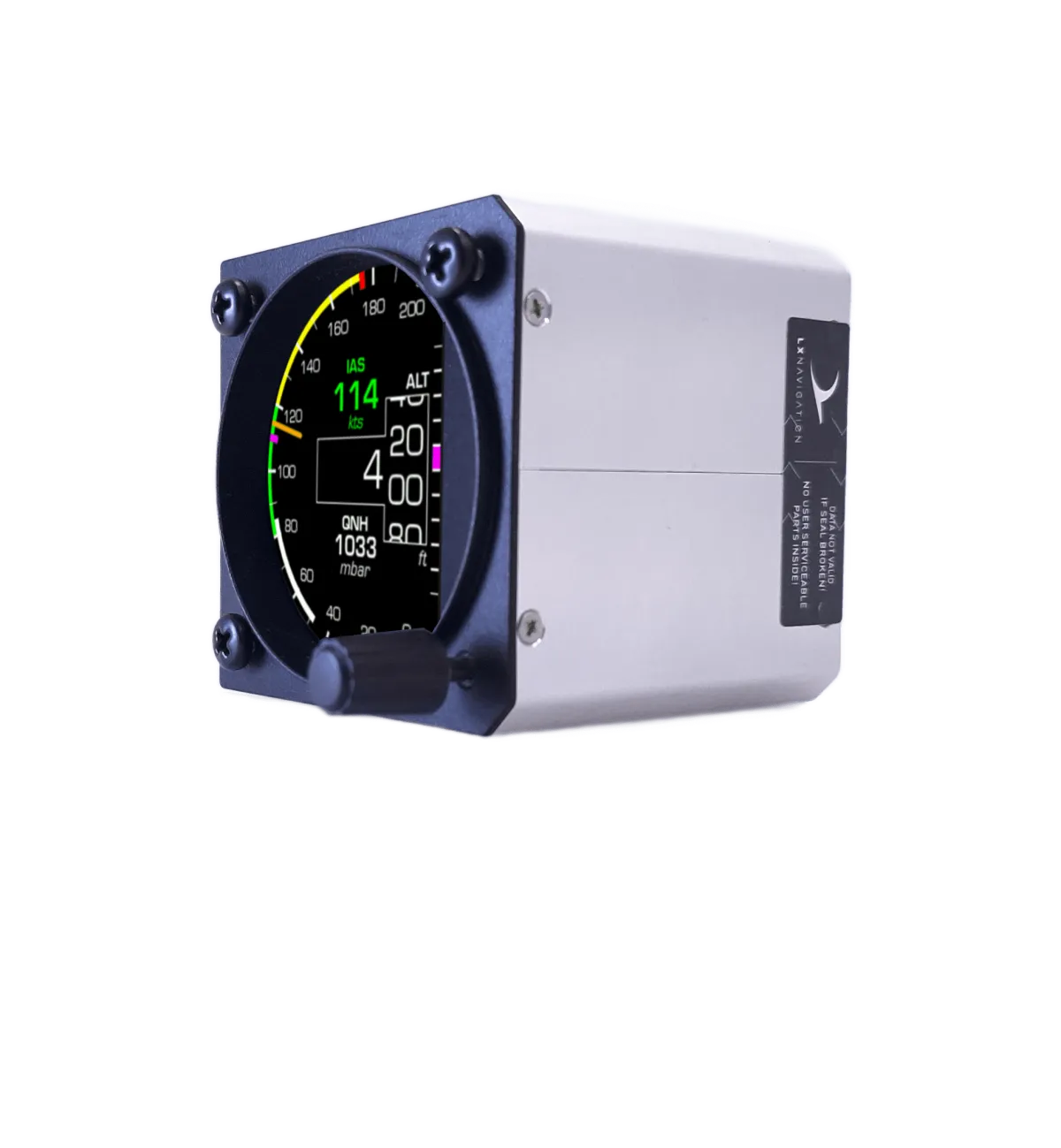
iris Gen 2 front render — full round display

Three big changes.

Everything you know from the iris series — the accuracy, the backup battery, the 30-minute install — carried onto new hardware.

360°
Full round LCD. No covered area.

Gen 1 hid part of a square panel behind the bezel. Gen 2 uses a fully round LCD that fills the entire face of the instrument — every pixel of the 57 mm face is display. Airspeed arcs, altitude tape and G-scale now wrap the full dial, just like the analog instruments they replace.

WiFi
Built into every device.

No external CAN2WiFi box anymore. Every Gen 2 iris hosts its own configurator — connect from any phone, tablet, PC or Mac and adjust layout, units, arcs and colours directly in the browser. Lock configuration for club and school aircraft with a device password.

2
Two models. That's it.

Gen 1 came as seven part numbers — all-in-one, airspeed, altimeter, VSI, chrono, G-force and slave — and too many panels ended up with the wrong box. Gen 2 is two: iris AiO with the sensors inside, and iris Display without. Every function is a setting, not a different product.

57 mm only

Gen 2 ships in the standard 57 mm cutout. Need 80 mm? The Gen 1 series remains available.

Backup battery. Still standard.

At least 3 hours of reserve in every device, activated only if you lose power mid-flight.

Same 30-minute install

Marked ports, sensors inside, CAN bus between devices — and a display that rotates to any direction, so the knob goes where your panel wants it.

THE LINEUP

Two models. Every function.

Choose by what sits behind the panel, not by what is drawn on the face. The face is configuration.

iris AiO
iris AiO
ALL-IN-ONE · SENSORS INSIDE

The instrument that measures. Pitot and static go in the back; airspeed, altitude and vertical speed come out the front — and over CAN to every other device on the bus.

  • Rotary knob — QNH, pages and menus without touching the configurator
  • Airspeed and altimeter sensors built in
  • Optional outside air temperature (OAT) probe
  • Any face: single readout, combined ASI + ALT + VSI, or pages you flip through
PICK THIS WHEN
Your first iris, or any panel that needs its own pressure sensors.
View in shop
iris Display
iris Display
DISPLAY · NO PRESSURE SENSORS

The same round face and the same WiFi configurator, without the sensors. It shows what the CAN bus already knows — or stands alone as a G-meter or chrono.

  • No pitot/static connection — data arrives over CAN
  • G-force function can be enabled — a standalone G-meter with nothing else attached
  • RS232 port for an external GNSS receiver (GPS mouse) — standalone chrono and GPS data
  • Repeater for a second seat, or an extra face for a system you already own
PICK THIS WHEN
You already have an AiO or any LX navigation CAN device — or you need a standalone G-meter or chrono.
View in shop
Both models: 57 mm cutout · full round LCD · WiFi inside · backup battery · CAN bus
CONFIGURATIONS

Which one do I need?

Every Gen 1 variant — airspeed, altimeter, VSI, chrono, G-force, slave — maps onto one of these. Configure the role, connect over CAN, fly.

YOU WANT
TAKE
HOW
Airspeed, altimeter and VSI in one instrument
iris AiO
Connect pitot and static. Done.
A dedicated airspeed indicator and a dedicated altimeter
iris AiO + iris Display
Configure the AiO as the airspeed indicator and the Display as the altimeter (or the other way round), then connect them over CAN.
A standalone G-force meter
iris Display
Enable the G-force function in the configurator. No CAN partner needed.
A standalone chrono
iris Display + external GNSS receiver
Plug a GPS mouse into the RS232 port; time and position come from there.
A repeater for the rear seat or second pilot
iris Display
One CAN cable from the front AiO — every readout mirrored, every page available.
More faces for a system you already fly — IRIS EFIS, IRIS EFIS Pro, Era or any LX navigation CAN device
iris Display
Plug it into the bus. It shows whatever your system already measures: airspeed, altitude, G-load, GPS.
Already flying an LX navigation CAN system? Adding an iris Display expands it — no second set of sensors, no second configuration. IRIS EFIS · Era
Phone next to iris Gen 2 — browser configurator
CONFIGURATION

The configurator now lives in the instrument.

Power the device, join its WiFi, open the browser. That's the whole setup chain — minutes before installation or years later in the hangar.

LAYOUT
Position, size and colour of every readout — arranged on the full round face.
FUNCTIONS
Airspeed, altimeter, VSI, G-force, chrono — switch each one on or off. The same hardware becomes whichever instrument the panel needs.
MARKINGS
Speed arcs, Vne red line and units to match your aircraft's flight manual.
UPDATES
Firmware updates over WiFi — no SD card shuffle.
LOCK
Password-protect the configuration — pilots can't reconfigure club aircraft.
ONLINE DEMO

Try the configurator before you buy.

The Iris layout designer in the LX navigation portal is the same canvas you get in the instrument: draw a face, watch it run on simulated flight data, then export the layout and import it into your iris. Free account, runs in any browser.

Gen 1 or Gen 2?

Gen 1 stays in the lineup — it remains the only choice for 80 mm panels.

FEATURE
IRIS GEN 1
IRIS GEN 2
Display
Square LCD, partly covered
Full round LCD, edge to edge
Lineup
Seven variants — AiO, airspeed, altimeter, VSI, chrono, G-force, slave
Two — iris AiO and iris Display
Functions
Fixed per variant
Enabled in the configurator
WiFi configuration
Via external CAN2WiFi
Built in
Cutout sizes
57 / 80 mm
57 mm
Backup battery
Up to 3 h
Up to 3 h
Firmware updates over WiFi
No
Yes
CAN bus
Yes
Yes
Configuration lock for clubs
Yes (no CAN2WiFi attached)
Yes (password)
Flying an 80 mm panel? See the Gen 1 iris series.

Technical specification.

CUTOUT
57 mm
DISPLAY
Full round LCD no covered area
MODELS
iris AiO · iris Display
SENSORS
AiO: airspeed + altimeter, optional OAT probe Display: none — data over CAN
CONFIGURATION
Built-in WiFi browser configurator
CONNECTIVITY
CAN · WiFi · RS232 for external GNSS
POWER SUPPLY
9–30 V DC
BACKUP BATTERY
Built-in, up to 3 h
CERTIFICATION
Non-TSO
GOOD TO KNOW
Gen 2 uses the same 57 mm cutout as Gen 1 — drop-in replacement, no new panel work.
Gen 1 and Gen 2 devices coexist on the same CAN bus.
An optional OAT probe (AiO) and an external GNSS receiver over RS232 (Display) extend what each model can show.
Technical support and two-year limited warranty included.

The round instrument,
finally all round.

iris Gen 2 is shipping now — order straight from the shop, or through your dealer.

NOT SURE YET?

Talk it through before you decide.

A free online video call with LX navigation or one of our dealers — in your language, about your panel, your aircraft, your questions.

Book a free consultation

Online · free · no obligation